AWS Cloud Operations #05: ALB — Traffic Distribution and High Availability
Running multiple EC2 instances is only part of building a scalable application.
The next question is:
How do you distribute incoming traffic across those instances?
That's where an Application Load Balancer (ALB) becomes important.
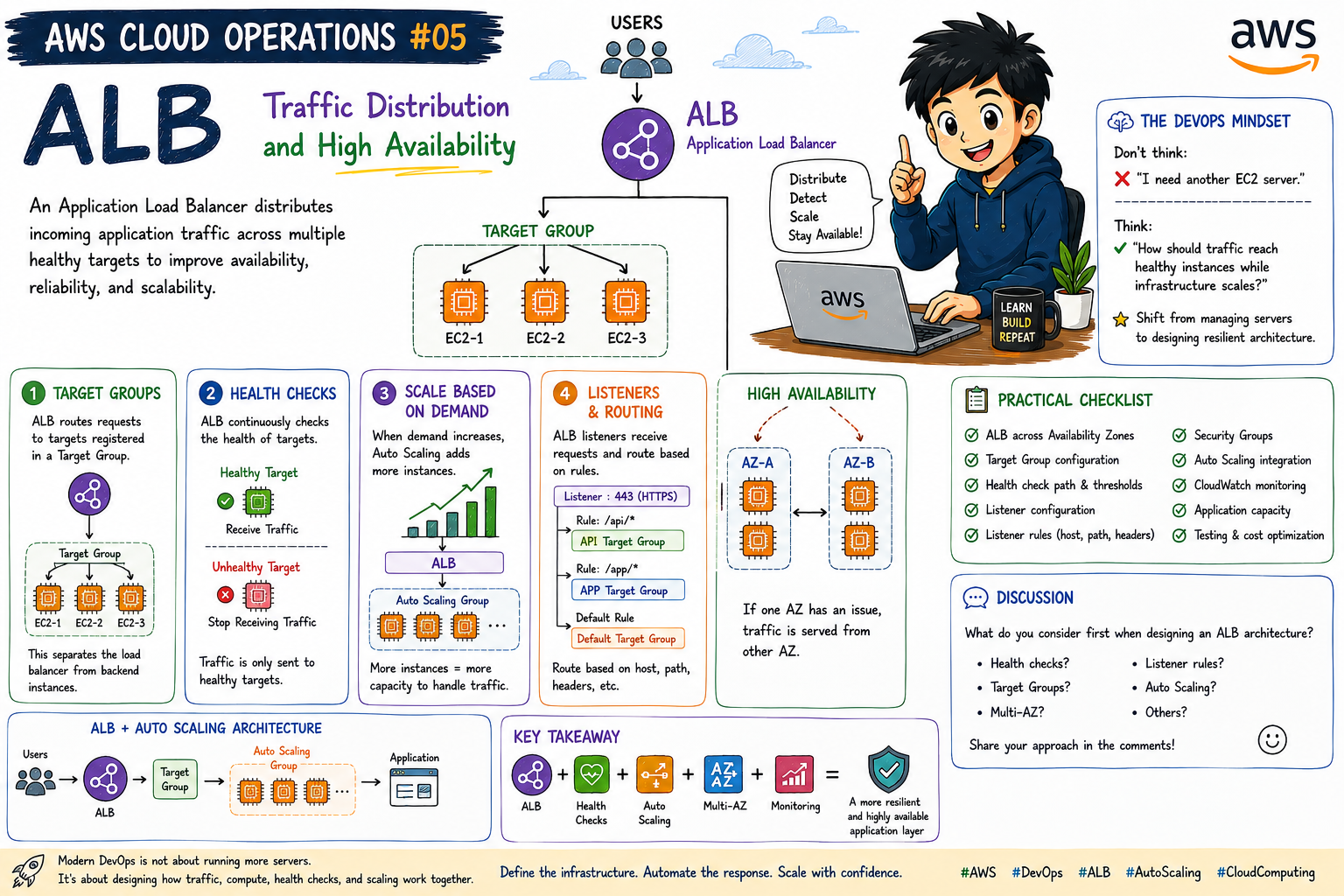
An ALB can distribute incoming application traffic across multiple targets, such as EC2 instances.
A simplified architecture looks like this:
Users
  ↓
Application Load Balancer
  ↓
EC2-1 | EC2-2 | EC2-3
Instead of sending every request to a single server, the ALB can distribute traffic across available targets.
What Is an Application Load Balancer?
An Application Load Balancer operates at the application layer and routes HTTP/HTTPS traffic to registered targets.
A typical architecture can look like:
                Users
                  ↓
                 ALB
                  ↓
            Target Group
          /       |       \
       EC2-1    EC2-2    EC2-3
The load balancer provides an entry point for the application while the backend instances handle the application workload.
1. Target Groups
The ALB routes requests to targets registered in a Target Group.
For example:
ALB
 ↓
Target Group
 ├── EC2-1
 ├── EC2-2
 └── EC2-3
The Target Group provides the backend target pool that the ALB can route traffic to.
This creates a clear separation between the load-balancing layer and the application instances.
2. Health Checks
One of the important capabilities of an ALB architecture is health checking.
A simplified flow:
ALB
 ↓
Health Check
 ↓
Healthy Target
 ↓
Receive Traffic
If a target becomes unhealthy:
ALB
 ↓
Health Check
 ↓
Unhealthy Target
 ↓
Stop Routing Traffic
This helps prevent requests from being routed to targets that are failing their configured health checks.
3. Combine ALB with Auto Scaling
This is where the architecture becomes more powerful.
Users
  ↓
ALB
  ↓
Auto Scaling Group
  ↓
EC2 Instances
When application demand increases, an Auto Scaling Group can launch additional EC2 instances.
The newly available healthy targets can then receive traffic through the ALB.
This creates a scalable traffic and compute architecture.
4. High Availability with Multiple Availability Zones
For a highly available architecture, distribute application capacity across multiple Availability Zones.
For example:
                 ALB
                /   \
               /     \
            AZ-A     AZ-B
             ↓         ↓
            EC2       EC2
            EC2       EC2
This reduces dependency on a single Availability Zone.
If one Availability Zone experiences an issue, the application can continue operating through capacity in another Availability Zone, assuming the overall architecture and capacity are designed appropriately.
5. Listeners and Routing
ALB listeners receive incoming connections and can use listener rules to determine how requests should be routed.
For example:
/api/*
   ↓
Backend Target Group
And:
/app/*
   ↓
Application Target Group
Routing can use conditions such as:
Host
Path
HTTP headers
This makes ALB useful for applications with multiple services or routing requirements.
ALB + Auto Scaling Architecture
Putting the components together:
                         Users
                           │
                           ▼
                    ┌─────────────┐
                    │     ALB     │
                    └──────┬──────┘
                           │
                    Target Group
                     /     |     \
                    /      |      \
                   ▼       ▼       ▼
                 EC2      EC2      EC2
                   \       |       /
                    \      |      /
                     Auto Scaling
                         Group
A more complete production pattern can look like:
Users
  ↓
ALB
  ↓
Target Group
  ↓
Auto Scaling Group
  ↓
EC2 Instances
  ↓
Application
The DevOps Mindset
Don't think:
"I need another EC2 server."
Think:
"How should traffic reach healthy application instances while the infrastructure scales?"
That's the shift from managing individual servers to designing a resilient application architecture.
Key Takeaway
A resilient application layer can combine:
ALB
+
Health Checks
+
Auto Scaling
+
Multiple Availability Zones
+
Monitoring
=
A more resilient and highly available application layer
An ALB isn't simply a traffic distributor.
It becomes an important part of an architecture that separates incoming traffic from backend compute and works together with health checks and Auto Scaling.
Practical Checklist
When designing an ALB-based architecture, consider:
[ ] ALB placement across Availability Zones
[ ] Target Group configuration
[ ] Health check path and thresholds
[ ] Listener configuration
[ ] Listener routing rules
[ ] Security Groups
[ ] Auto Scaling integration
[ ] Multiple Availability Zones
[ ] CloudWatch monitoring
[ ] Application capacity
Final Thought
Modern DevOps isn't just about running more servers.
It's about designing how traffic, compute, health checks, and scaling work together.
Distribute traffic. Detect unhealthy targets. Scale compute. Design for failure.
Discussion
💬 What do you consider first when designing an ALB architecture?
Health checks?
Target Groups?
Multi-AZ?
Listener rules?
Auto Scaling?
Share your approach in the comments. 👇
Comments
Join the discussionNo comments yet. Be the first to comment.
AWS Cloud Operations
A practical AWS learning series covering EC2, AMIs, Launch Templates, Auto Scaling, Load Balancing, monitoring, security, high availability, and production-ready cloud architecture.