☁️ What is Cloud Computing? A Beginner's Guide to Modern Cloud Technology
Learn what cloud computing is, how it works, its benefits, deployment models, service models, and why it is the foundation of Amazon Web Services (AWS).
Introduction
Imagine you want to launch a new website for your business.
Ten years ago, you would have needed to purchase expensive servers, rent space in a data center, install operating systems, configure networking equipment, and hire engineers to maintain everything. This process could take weeks or even months before your application became available to users.
Today, the same infrastructure can be provisioned in just a few minutes with a few clicks.
This transformation is possible because of Cloud Computing.
Cloud computing has fundamentally changed the way organizations build, deploy, and scale applications. Whether you're streaming movies on Netflix, storing files in Google Drive, shopping on Amazon, or attending meetings on Zoom, you're using cloud computing every day.
If you're planning to learn Amazon Web Services (AWS), DevOps, or Kubernetes, understanding cloud computing is the first step.
In this article, we'll explore cloud computing from the ground up using simple explanations and real-world examples.
What is Cloud Computing?
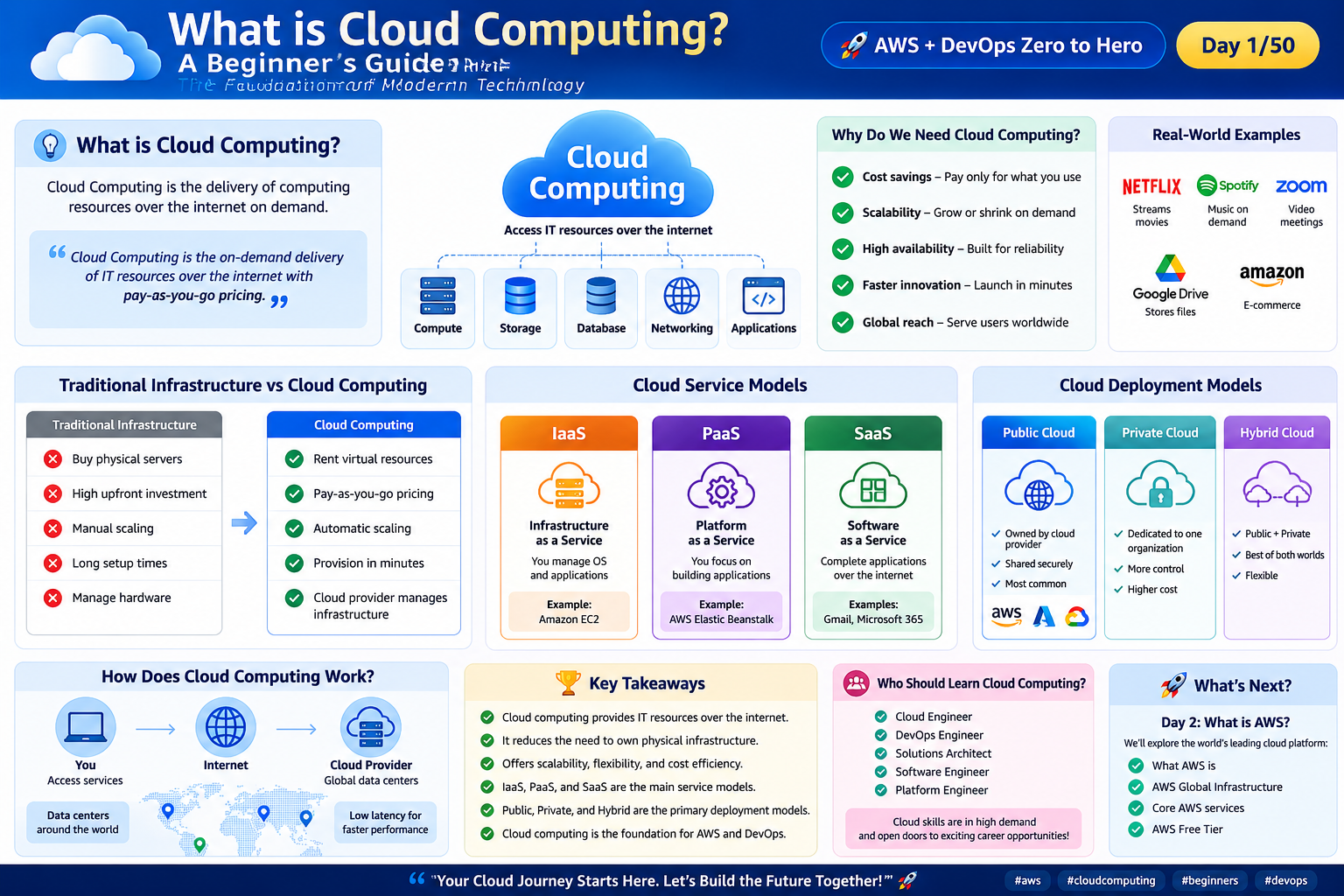
Cloud Computing is the on-demand delivery of computing resources over the internet.
Instead of buying and maintaining physical infrastructure, organizations rent computing resources from cloud providers whenever they need them.
These resources include:
Virtual Servers
Storage
Databases
Networking
Security Services
Artificial Intelligence Services
Analytics
Monitoring
Backup Solutions
The best part?
You only pay for what you use.
Simple Definition
Cloud Computing is the delivery of computing resources over the internet using a pay-as-you-go pricing model.
Understanding Cloud Computing with a Real-World Example
Imagine electricity.
Most people don't own a power plant.
Instead, they consume electricity whenever they need it and pay only for the amount they use.
Cloud computing works exactly the same way.
Instead of buying expensive servers, organizations simply "consume" computing resources whenever they're required.
This eliminates large upfront investments and provides much greater flexibility.
Before Cloud Computing
Before cloud computing became popular, organizations relied on on-premises infrastructure.
This meant they had to:
Purchase servers
Build server rooms
Configure networking devices
Install operating systems
Replace failed hardware
Manage backups
Plan future capacity
Suppose an e-commerce company expected one million visitors during a festive sale.
To prepare, it would purchase additional servers months in advance.
After the sale, those servers often remained underutilized, wasting money and resources.
After Cloud Computing
Cloud computing completely changed this approach.
Now organizations can:
Launch servers within minutes
Scale automatically during traffic spikes
Remove unused resources instantly
Pay only for what they actually use
This flexibility allows businesses to innovate much faster.
Traditional Infrastructure vs Cloud Computing
| Traditional Infrastructure | Cloud Computing |
|---|---|
| Buy physical servers | Rent virtual infrastructure |
| Large upfront investment | Pay-as-you-go pricing |
| Manual hardware maintenance | Managed by the cloud provider |
| Weeks to deploy infrastructure | Minutes to provision resources |
| Limited scalability | Scale on demand |
| Hardware replacement required | High availability managed by provider |
Why Do We Need Cloud Computing?
Cloud computing solves many problems that organizations faced with traditional infrastructure.
1. Cost Savings
Instead of purchasing expensive hardware, organizations pay only for the resources they consume.
This significantly reduces capital expenditure.
2. Scalability
Applications can automatically scale according to demand.
For example:
During a flash sale, additional servers can be added automatically.
When traffic decreases, unnecessary resources can be removed.
3. High Availability
Leading cloud providers operate multiple data centers across the world.
If one location experiences an issue, workloads can often continue running from another location.
4. Faster Innovation
Developers no longer wait weeks for infrastructure.
They can provision servers, databases, and networking resources within minutes.
5. Global Reach
Applications can be deployed closer to users around the world, reducing latency and improving performance.
Cloud Service Models
Cloud providers offer services at different levels depending on how much management responsibility you want.
Infrastructure as a Service (IaaS)
The cloud provider manages the physical infrastructure.
You manage:
Operating System
Applications
Middleware
Runtime
Examples:
Amazon EC2
Azure Virtual Machines
Platform as a Service (PaaS)
The provider manages both infrastructure and the application platform.
Developers simply deploy their applications.
Examples:
AWS Elastic Beanstalk
Google App Engine
Software as a Service (SaaS)
The provider delivers complete software over the internet.
Users simply sign in and start using it.
Examples:
Gmail
Microsoft 365
Salesforce
Cloud Deployment Models
Public Cloud
Infrastructure is owned and operated by a cloud provider.
Examples include:
Amazon Web Services (AWS)
Microsoft Azure
Google Cloud Platform (GCP)
Private Cloud
Infrastructure is dedicated to a single organization.
It provides greater control but generally comes with higher operational costs.
Hybrid Cloud
A combination of public and private cloud environments.
Organizations can keep sensitive workloads private while using the public cloud for scalable applications.
Real-World Examples
Cloud computing powers many services we use every day.
| Service | How Cloud Computing Helps |
|---|---|
| Netflix | Streams movies globally |
| Spotify | Delivers music on demand |
| Zoom | Hosts online meetings |
| Google Drive | Stores files securely |
| Amazon | Powers e-commerce worldwide |
Without cloud computing, these platforms would struggle to scale to millions of users.
Benefits of Cloud Computing
Cloud computing offers several advantages:
Lower infrastructure costs
Faster deployments
Improved scalability
Better disaster recovery
Global availability
Increased flexibility
Strong security capabilities
Continuous innovation
Popular Cloud Providers
Today, three providers dominate the cloud market.
| Provider | Popular Services |
|---|---|
| Amazon Web Services (AWS) | EC2, S3, Lambda, RDS |
| Microsoft Azure | Virtual Machines, Azure SQL, Blob Storage |
| Google Cloud Platform | Compute Engine, Cloud Storage, BigQuery |
Among these, AWS offers one of the broadest portfolios of cloud services and is widely used across startups, enterprises, and government organizations.
Why Should You Learn Cloud Computing?
Cloud computing skills are valuable for many technology careers, including:
Cloud Engineer
DevOps Engineer
Site Reliability Engineer (SRE)
Platform Engineer
Solutions Architect
Software Engineer
Cloud Security Engineer
Whether you're deploying applications, automating infrastructure, or designing scalable systems, cloud computing knowledge is essential.
Common Misconceptions
❌ Cloud Computing is only for large companies.
No. Individuals, students, startups, and enterprises all use cloud platforms.
❌ Cloud Computing is too expensive.
Many providers offer free tiers, and the pay-as-you-go model allows users to control costs.
❌ The cloud is always someone else's computer.
While cloud providers own the physical infrastructure, customers still manage many aspects of their workloads depending on the service model they choose.
Mini Hands-on Activity
If you're just starting your cloud journey:
Create an AWS Free Tier account.
Sign in to the AWS Management Console.
Explore the list of AWS services.
Locate the Billing Dashboard.
Browse available AWS Regions.
Don't create any resources yet—simply become familiar with the platform.
Key Takeaways
Cloud Computing delivers IT resources over the internet.
Organizations no longer need to own physical infrastructure.
The pay-as-you-go model reduces upfront costs.
IaaS, PaaS, and SaaS are the primary cloud service models.
Public, Private, and Hybrid are the main deployment models.
Cloud computing enables faster innovation, scalability, and global availability.
AWS is one of the leading cloud platforms built on these principles.
Conclusion
Cloud computing has transformed the way modern applications are built, deployed, and managed. By eliminating the need for organizations to purchase and maintain their own infrastructure, it enables faster innovation, better scalability, and more efficient use of resources.
Whether your goal is to become an AWS Cloud Engineer, DevOps Engineer, or Solutions Architect, understanding cloud computing is the first and most important step.
In the next article, we'll explore Amazon Web Services (AWS) and learn why it has become the world's leading cloud platform.
What's Next?
🚀 What is AWS? A Beginner's Guide to Amazon Web Services
We'll cover:
What AWS is
Why AWS is so popular
AWS Global Infrastructure
Core AWS services
AWS Free Tier
Common real-world use cases
If you found this article helpful, consider following me for more beginner-friendly content on AWS, Cloud Computing, and DevOps. Let's learn and build together!
☁️ What is Cloud Computing? A Complete Beginner's Guide
Learn what cloud computing is, why it matters, how it works, and why it has become the foundation of modern technologies like AWS, DevOps, Kubernetes, and AI.
Introduction
Imagine you want to launch a new website for your business.
Ten years ago, you would have needed to purchase expensive servers, rent space in a data center, install operating systems, configure networking equipment, and hire engineers to maintain everything. This process could take weeks or even months before your application became available to users.
Today, the same infrastructure can be provisioned in just a few minutes with a few clicks.
This transformation is possible because of Cloud Computing.
Cloud computing has fundamentally changed the way organizations build, deploy, and scale applications. Whether you're streaming movies on Netflix, storing files in Google Drive, shopping on Amazon, or attending meetings on Zoom, you're using cloud computing every day.
If you're planning to learn Amazon Web Services (AWS), DevOps, or Kubernetes, understanding cloud computing is the first step.
In this article, we'll explore cloud computing from the ground up using simple explanations and real-world examples.
What is Cloud Computing?
Cloud Computing is the on-demand delivery of computing resources over the internet.
Instead of buying and maintaining physical infrastructure, organizations rent computing resources from cloud providers whenever they need them.
These resources include:
Virtual Servers
Storage
Databases
Networking
Security Services
Artificial Intelligence Services
Analytics
Monitoring
Backup Solutions
The best part?
You only pay for what you use.
Simple Definition
Cloud Computing is the delivery of computing resources over the internet using a pay-as-you-go pricing model.
Understanding Cloud Computing with a Real-World Example
Imagine electricity.
Most people don't own a power plant.
Instead, they consume electricity whenever they need it and pay only for the amount they use.
Cloud computing works exactly the same way.
Instead of buying expensive servers, organizations simply "consume" computing resources whenever they're required.
This eliminates large upfront investments and provides much greater flexibility.
Before Cloud Computing
Before cloud computing became popular, organizations relied on on-premises infrastructure.
This meant they had to:
Purchase servers
Build server rooms
Configure networking devices
Install operating systems
Replace failed hardware
Manage backups
Plan future capacity
Suppose an e-commerce company expected one million visitors during a festive sale.
To prepare, it would purchase additional servers months in advance.
After the sale, those servers often remained underutilized, wasting money and resources.
After Cloud Computing
Cloud computing completely changed this approach.
Now organizations can:
Launch servers within minutes
Scale automatically during traffic spikes
Remove unused resources instantly
Pay only for what they actually use
This flexibility allows businesses to innovate much faster.
Traditional Infrastructure vs Cloud Computing
| Traditional Infrastructure | Cloud Computing |
|---|---|
| Buy physical servers | Rent virtual infrastructure |
| Large upfront investment | Pay-as-you-go pricing |
| Manual hardware maintenance | Managed by the cloud provider |
| Weeks to deploy infrastructure | Minutes to provision resources |
| Limited scalability | Scale on demand |
| Hardware replacement required | High availability managed by provider |
Why Do We Need Cloud Computing?
Cloud computing solves many problems that organizations faced with traditional infrastructure.
1. Cost Savings
Instead of purchasing expensive hardware, organizations pay only for the resources they consume.
This significantly reduces capital expenditure.
2. Scalability
Applications can automatically scale according to demand.
For example:
During a flash sale, additional servers can be added automatically.
When traffic decreases, unnecessary resources can be removed.
3. High Availability
Leading cloud providers operate multiple data centers across the world.
If one location experiences an issue, workloads can often continue running from another location.
4. Faster Innovation
Developers no longer wait weeks for infrastructure.
They can provision servers, databases, and networking resources within minutes.
5. Global Reach
Applications can be deployed closer to users around the world, reducing latency and improving performance.
Cloud Service Models
Cloud providers offer services at different levels depending on how much management responsibility you want.
Infrastructure as a Service (IaaS)
The cloud provider manages the physical infrastructure.
You manage:
Operating System
Applications
Middleware
Runtime
Examples:
Amazon EC2
Azure Virtual Machines
Platform as a Service (PaaS)
The provider manages both infrastructure and the application platform.
Developers simply deploy their applications.
Examples:
AWS Elastic Beanstalk
Google App Engine
Software as a Service (SaaS)
The provider delivers complete software over the internet.
Users simply sign in and start using it.
Examples:
Gmail
Microsoft 365
Salesforce
Cloud Deployment Models
Public Cloud
Infrastructure is owned and operated by a cloud provider.
Examples include:
Amazon Web Services (AWS)
Microsoft Azure
Google Cloud Platform (GCP)
Private Cloud
Infrastructure is dedicated to a single organization.
It provides greater control but generally comes with higher operational costs.
Hybrid Cloud
A combination of public and private cloud environments.
Organizations can keep sensitive workloads private while using the public cloud for scalable applications.
Real-World Examples
Cloud computing powers many services we use every day.
| Service | How Cloud Computing Helps |
|---|---|
| Netflix | Streams movies globally |
| Spotify | Delivers music on demand |
| Zoom | Hosts online meetings |
| Google Drive | Stores files securely |
| Amazon | Powers e-commerce worldwide |
Without cloud computing, these platforms would struggle to scale to millions of users.
Benefits of Cloud Computing
Cloud computing offers several advantages:
Lower infrastructure costs
Faster deployments
Improved scalability
Better disaster recovery
Global availability
Increased flexibility
Strong security capabilities
Continuous innovation
Popular Cloud Providers
Today, three providers dominate the cloud market.
| Provider | Popular Services |
|---|---|
| Amazon Web Services (AWS) | EC2, S3, Lambda, RDS |
| Microsoft Azure | Virtual Machines, Azure SQL, Blob Storage |
| Google Cloud Platform | Compute Engine, Cloud Storage, BigQuery |
Among these, AWS offers one of the broadest portfolios of cloud services and is widely used across startups, enterprises, and government organizations.
Why Should You Learn Cloud Computing?
Cloud computing skills are valuable for many technology careers, including:
Cloud Engineer
DevOps Engineer
Site Reliability Engineer (SRE)
Platform Engineer
Solutions Architect
Software Engineer
Cloud Security Engineer
Whether you're deploying applications, automating infrastructure, or designing scalable systems, cloud computing knowledge is essential.
Common Misconceptions
❌ Cloud Computing is only for large companies.
No. Individuals, students, startups, and enterprises all use cloud platforms.
❌ Cloud Computing is too expensive.
Many providers offer free tiers, and the pay-as-you-go model allows users to control costs.
❌ The cloud is always someone else's computer.
While cloud providers own the physical infrastructure, customers still manage many aspects of their workloads depending on the service model they choose.
Mini Hands-on Activity
If you're just starting your cloud journey:
Create an AWS Free Tier account.
Sign in to the AWS Management Console.
Explore the list of AWS services.
Locate the Billing Dashboard.
Browse available AWS Regions.
Don't create any resources yet—simply become familiar with the platform.
Key Takeaways
Cloud Computing delivers IT resources over the internet.
Organizations no longer need to own physical infrastructure.
The pay-as-you-go model reduces upfront costs.
IaaS, PaaS, and SaaS are the primary cloud service models.
Public, Private, and Hybrid are the main deployment models.
Cloud computing enables faster innovation, scalability, and global availability.
AWS is one of the leading cloud platforms built on these principles.
Conclusion
Cloud computing has transformed the way modern applications are built, deployed, and managed. By eliminating the need for organizations to purchase and maintain their own infrastructure, it enables faster innovation, better scalability, and more efficient use of resources.
Whether your goal is to become an AWS Cloud Engineer, DevOps Engineer, or Solutions Architect, understanding cloud computing is the first and most important step.
In the next article, we'll explore Amazon Web Services (AWS) and learn why it has become the world's leading cloud platform.
What's Next?
🚀 What is AWS? A Beginner's Guide to Amazon Web Services
We'll cover:
What AWS is
Why AWS is so popular
AWS Global Infrastructure
Core AWS services
AWS Free Tier
Common real-world use cases
If you found this article helpful, consider following me for more beginner-friendly content on AWS, Cloud Computing, and DevOps. Let's learn and build together!
Comments
Join the discussionNo comments yet. Be the first to comment.